Sokuri · Knowledge basket
Save it the second you see it
One tap on the share button — YouTube, Instagram, anywhere. The card appears instantly, and AI fills in the title, thumbnail, folder and tags behind it. Share the folder later with a single link.
10-second sign-up · no card needed
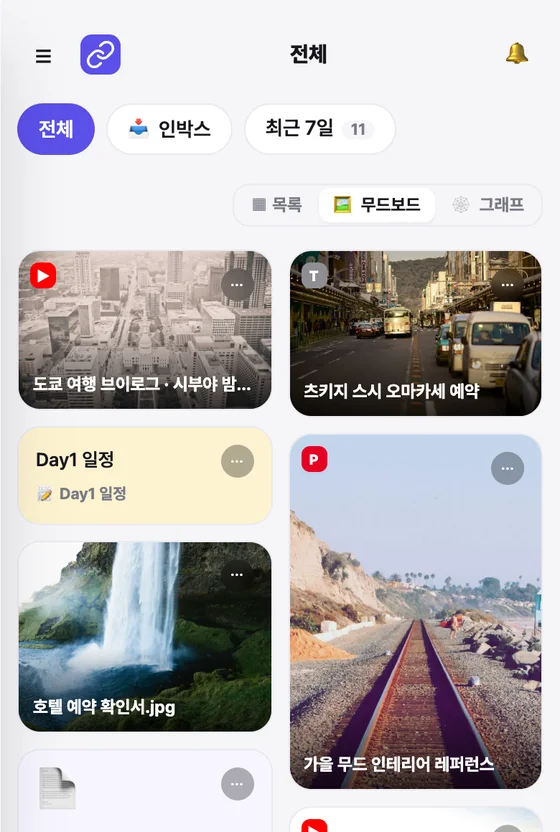
- ▶ Tokyo travel vlog#Travel
- ◎ Autumn interior refs#Reference
- 📎 hotel-booking.jpg
✨ AI adds title, folder, tags
01 Save
One tap on share
Links, notes, photos, PDFs, sheets
02 Organize
AI writes the title, picks the folder
Clear a full inbox in one go
03 Together
Invite with one link
Can edit, or view only
04 Connect
Claude saves for you
A whole plan as one folder
Saving
All it takes is the share button
Hit save and the card appears right away. Title, thumbnail, folder and tags fill in behind it, so there is nothing to wait for. Links, notes and photos all land in the same basket.
One tap, anywhere
Use the share button in YouTube, Instagram or your browser. A link you already copied is pasted for you when the app opens. On a big screen, drag and drop or just paste.
Sokuri does the filing
It picks one of the folders you already use and adds tags. For photos and screenshots it looks at the image and writes a title. It never invents new folders on its own.
Not just links
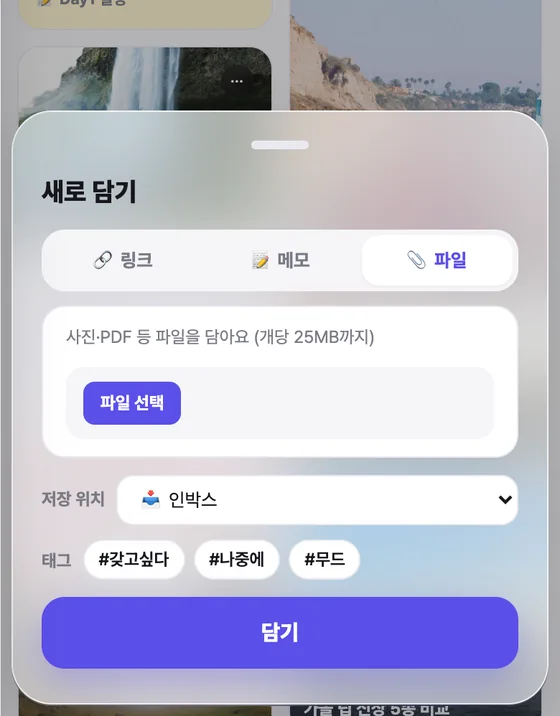
Photos, screenshots, PDFs — same place
The screen you captured, the contract you downloaded, the sheet you made — they sit right next to your links. Images get a thumbnail and an AI-written title.
- Free 100MB · Standard 5GB (25MB per file)
- Drag and drop, paste, or shoot with the camera
- Only you can open the files you upload
Together
A folder becomes a room
A folder two people use to plan a trip and a folder thousands of people follow are made the same way. Pick a template, send one link.
Collect with a friend
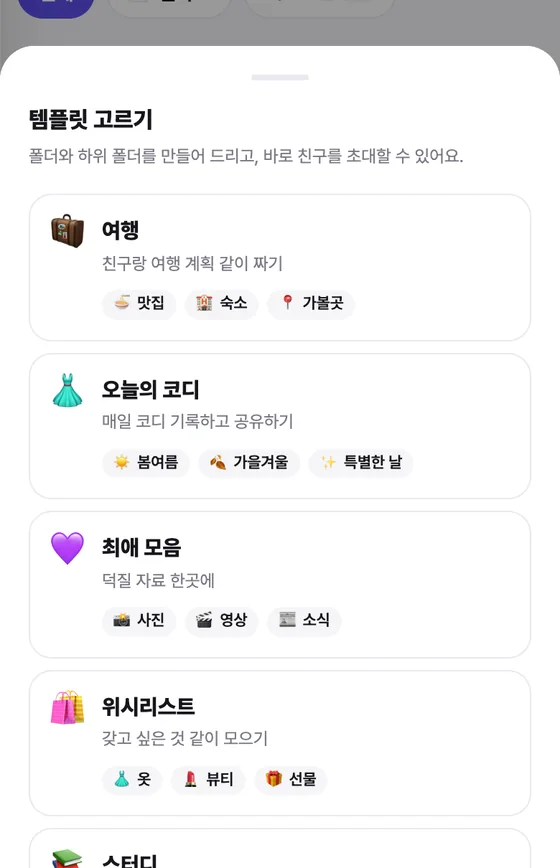
Choose a template and the subfolders come with it, followed by an invite link. Everyone adds their own, and only the person who added a link can remove it.
Templates
No blank-folder moment
Pick Trip and you get Food, Stays and Places. Pick Outfit and you get Spring–Summer, Fall–Winter and Special days. Three taps from creating it to inviting someone.
- Set the role on the invite link — can edit, or view only
- No expiry, 7 days or 30 days — and a cap on how many can join
- A locked subfolder is invisible to the people you invited
AI connection · MCP
Plans you made with Claude, saved whole
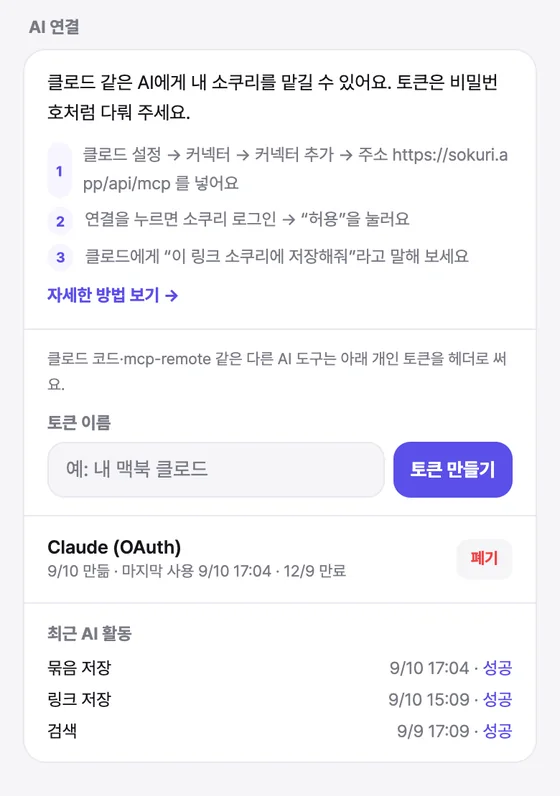
Connect Sokuri to Claude and “save this to Sokuri” is all it takes. Claude shows you the folder plan first; once you approve, folders, subfolders, checklists and links are saved in one go.
- Claude cannot delete anything — we never built a delete tool
- Disconnect any time, and every action is logged
- Included on the free plan
Three views
One basket, three ways to look
Moodboard is the default — images first, sticky notes mixed in by colour. Switch to a compact list to skim, or to the graph to see how your interests connect.
- Open a parent folder and its subfolders come with it
- A place that holds just the last 7 days
- Folders and tags live behind the ≡ menu

Also
Things that make you use what you saved
Repeating notes
Put a cycle on a checklist note and it empties itself daily or weekly. Your streak fills in on a calendar. In a shared folder you can see who ticked what.
Folder locks
Inside a shared folder, keep some subfolders to yourself and open others to chosen members. Blocked on the server, not just hidden on screen.
Public taste profile
Turn on sokuri.app/u/you and only the folders you choose are shown. Paste it in an Instagram bio and it renders as a card. Off by default.
Where Sokuri is going
From a place to save, to a place to ask
Material built from what you chose, not from what a feed chose for you. Once it piles up it becomes searchable — and eventually something you can ask.
Step 1
You are hereThe basket
Save, let AI file it, share it. This is Sokuri today.
Step 2
In progressThe archive
“Ask my Sokuri” — search and summarise across everything you saved.
Step 3
After thatTaste data
What you chose adds up to a picture of you.
Pricing
$1.99 a month. No features locked away.
AI organizing, the Claude connection and collecting together are all on the free plan. $1.99 a month removes the ads and opens 5GB of file storage. That is the whole difference.
Free
$0
Free forever
- Unlimited links & notes
- AI organizing · moodboard · graph
- Unlimited folder sharing
- Claude connection
- 100MB of files · ads shown
Standard
$1.99/ month
Billed in USD · your local price may vary
- No ads
- 5GB for files & screenshots
- Everything in Free
Yearly billing costs less — see the price in the app
Billed through the App Store. Cancel any time.
Pro · Max
Coming soon
- More storage
- AI digest
- File content analysis
Get started
Save one thing you saw today
Ten seconds to sign up, no card. Once a few things are in, AI starts picking the folder for you.